










Neste artigo
Binary search is an algorithm that finds a value in a sorted array by cutting the search space in half at every step. Instead of checking item by item, it looks at the value in the middle and throws away the half where the target can’t be.
Linear search, the simplest one, checks the values one by one, from the first to the last. Binary search is much faster! And you’ll see that you’ve known it since you were a kid; you just didn’t know its name haha.
How does binary search work?
Think of the game of guessing a number from 1 to 100. I think of a number and you try to find out which one it is. After each guess, I only answer “higher” or “lower”. Would you start with 1, then 2, then 3? Of course not! You guess 50. If I say “higher”, you’ve just thrown away half of the numbers in one go. Then you guess 75, and so on. That’s binary search!!!
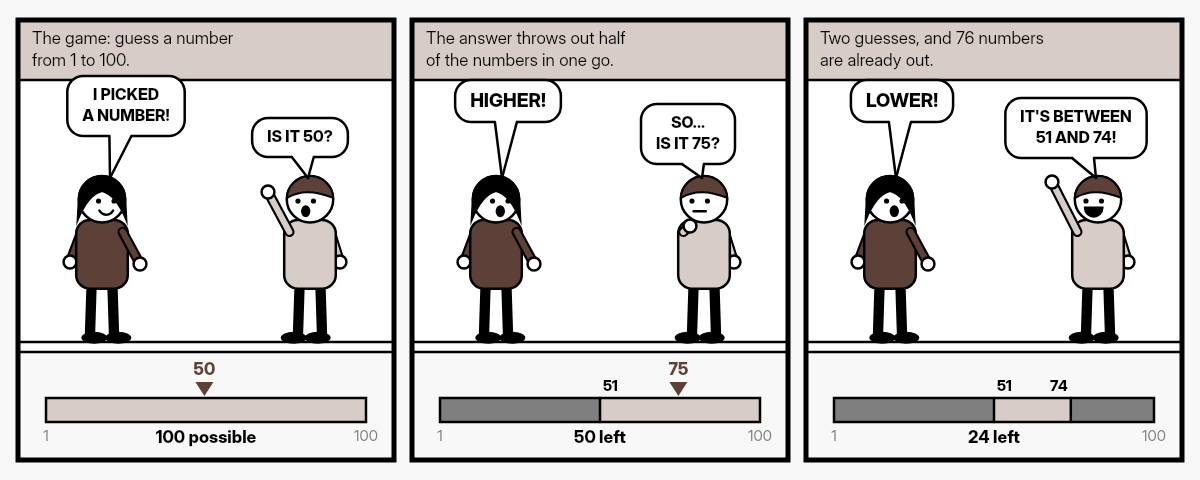
The algorithm always repeats the same three steps:
- Look at the value in the middle of the array.
- If it’s the target, you found it. Done.
- If it isn’t, throw away the half where the target can’t be and repeat with the half that’s left.
IMPORTANT: binary search only works if the array is sorted. With the values in random order, knowing that the middle one is smaller than the target says nothing about which side the target is on. Got it?
Binary search example, step by step
Let’s look for the number 52 in this 10-position array:
| Position | 0 | 1 | 2 | 3 | 4 | 5 | 6 | 7 | 8 | 9 |
|---|---|---|---|---|---|---|---|---|---|---|
| Value | 3 | 7 | 12 | 18 | 25 | 31 | 40 | 52 | 67 | 80 |
Notice that the values are already in increasing order: 3, 7, 12, 18 and so on, up to 80. That’s no accident! I’ll say it again because it matters: in this article, the data is already sorted. If it weren’t, it would have to be sorted before the search.
| Step | Low | High | Mid | Middle value | Decision |
|---|---|---|---|---|---|
| 1 | 0 | 9 | 4 | 25 | 25 is less than 52: throw away the left half |
| 2 | 5 | 9 | 7 | 52 | Found it! 52 is at position 7 |
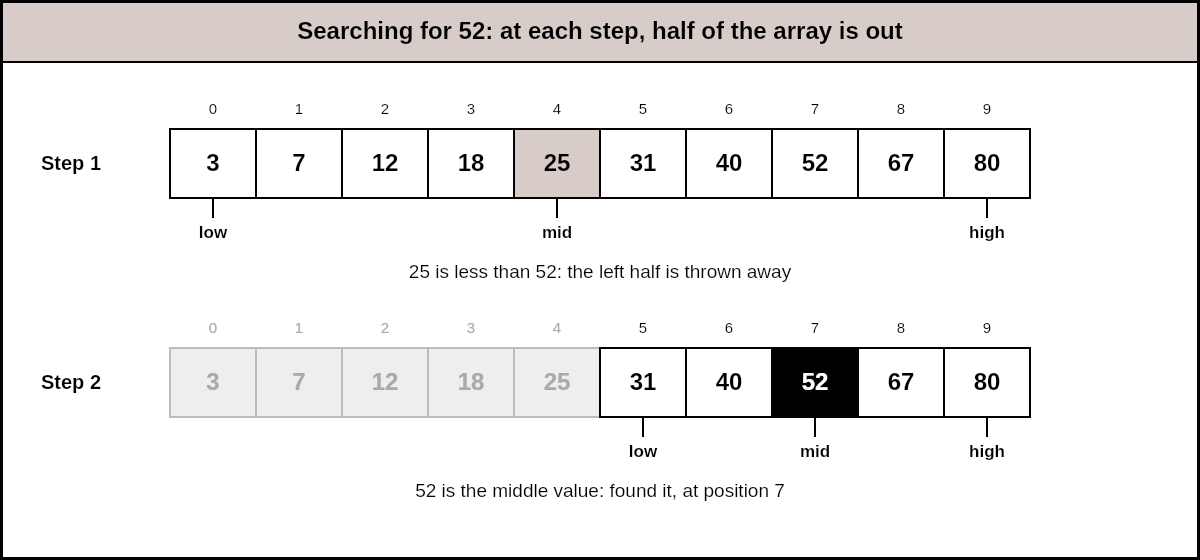
52 showed up after two comparisons. Checking item by item from the beginning, it would take eight.
See the binary search animation, step by step
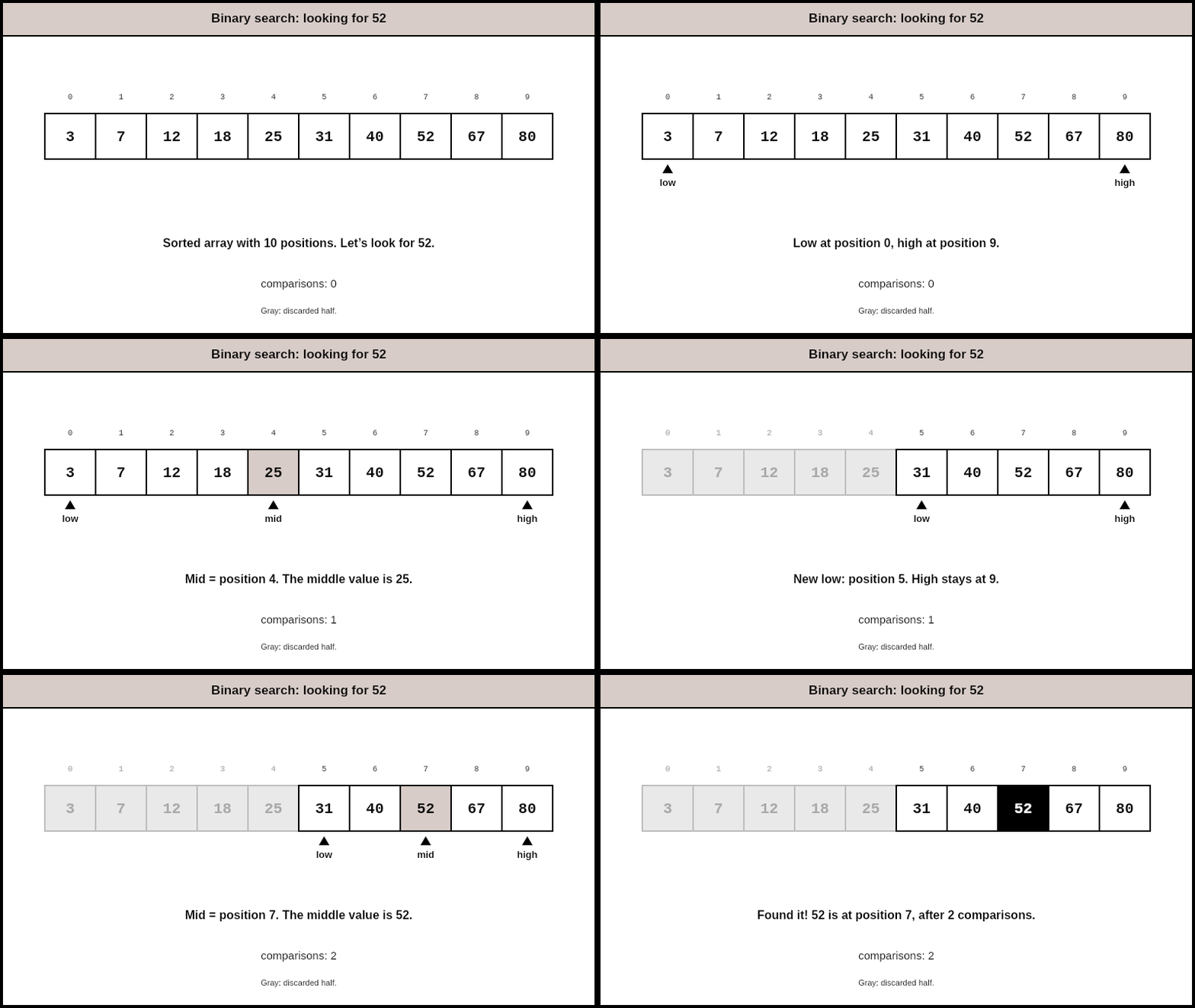
Binary search in PHP, Python, C and JavaScript
Here it is in PHP:
<?php

function binarySearch(array $numbers, int $target): int
{
    $low = 0;
    $high = count($numbers) - 1;

    while ($low <= $high) {
        $mid = intdiv($low + $high, 2);

        if ($numbers[$mid] === $target) {
            return $mid; // found it: return the position
        }

        if ($numbers[$mid] < $target) {
            $low = $mid + 1; // the target is in the right half
        } else {
            $high = $mid - 1; // the target is in the left half
        }
    }

    return -1; // not in the array
}

$numbers = [3, 7, 12, 18, 25, 31, 40, 52, 67, 80];

echo binarySearch($numbers, 52), PHP_EOL; // 7
echo binarySearch($numbers, 5), PHP_EOL;  // -1
In Python:
def binary_search(numbers, target):
    low = 0
    high = len(numbers) - 1

    while low <= high:
        mid = (low + high) // 2

        if numbers[mid] == target:
            return mid  # found it: return the position

        if numbers[mid] < target:
            low = mid + 1  # the target is in the right half
        else:
            high = mid - 1  # the target is in the left half

    return -1  # not in the array

numbers = [3, 7, 12, 18, 25, 31, 40, 52, 67, 80]

print(binary_search(numbers, 52))  # 7
print(binary_search(numbers, 5))   # -1
And in C:
#include <stdio.h>

int binary_search(int numbers[], int size, int target) {
    int low = 0;
    int high = size - 1;

    while (low <= high) {
        int mid = low + (high - low) / 2;

        if (numbers[mid] == target) {
            return mid; // found it: return the position
        }

        if (numbers[mid] < target) {
            low = mid + 1; // the target is in the right half
        } else {
            high = mid - 1; // the target is in the left half
        }
    }

    return -1; // not in the array
}

int main(void) {
    int numbers[] = {3, 7, 12, 18, 25, 31, 40, 52, 67, 80};

    printf("%d\n", binary_search(numbers, 10, 52)); // 7
    printf("%d\n", binary_search(numbers, 10, 5));  // -1
    return 0;
}
And in JavaScript:
function binarySearch(numbers, target) {
  let low = 0;
  let high = numbers.length - 1;

  while (low <= high) {
    const mid = Math.floor((low + high) / 2);

    if (numbers[mid] === target) {
      return mid; // found it: return the position
    }

    if (numbers[mid] < target) {
      low = mid + 1; // the target is in the right half
    } else {
      high = mid - 1; // the target is in the left half
    }
  }

  return -1; // not in the array
}

const numbers = [3, 7, 12, 18, 25, 31, 40, 52, 67, 80];
console.log(binarySearch(numbers, 52)); // 7
console.log(binarySearch(numbers, 5)); // -1
Did you notice that the idea is the same in all four languages? Two variables, low and high, mark the start and the end of the part that’s still left to check, and on every turn of the loop that part is cut in half. I’ll say it again because it matters: focus on the concept, not the language!
And don’t forget: in every example, the numbers array comes in already sorted. I ran the test with the same ten values out of order, [52, 3, 80, 12, 25, 7, 67, 18, 31, 40]: the search for 52 returned -1, as if it weren’t there, even with 52 right in the first position. An unsorted array has to be sorted before binary search.
A detail in C: the middle was calculated as low + (high - low) / 2. The result is the same, but this form keeps the sum low + high from going past the limit of the int type in very large arrays.
And a detail in JavaScript: the expression (low + high) / 2 doesn’t drop the decimal part. With low at 0 and high at 9, it gives 4.5, and position 4.5 doesn’t exist in the array. I tested it without Math.floor: the search for 52 returned -1, as if it weren’t there, and without any error message. Math.floor rounds the middle down, and the search works again.
Can binary search be done with recursion?
Yes, it can! A recursive function needs a base case, which stops the calls, and a recursive call, in which the function calls itself. Here the base case is finding the value or having nothing left to search. The recursive call is to search again, only in the half that’s left. Here it is in Python:
def binary_search(numbers, target, low, high):
    if low > high:
        return -1  # base case: nothing left to search

    mid = (low + high) // 2

    if numbers[mid] == target:
        return mid  # base case: found it

    if numbers[mid] < target:
        return binary_search(numbers, target, mid + 1, high)

    return binary_search(numbers, target, low, mid - 1)

numbers = [3, 7, 12, 18, 25, 31, 40, 52, 67, 80]

print(binary_search(numbers, 52, 0, len(numbers) - 1))  # 7
Binary search or linear search?
The search that checks item by item is linear search (or sequential search). The difference between the two shows up when the array grows. Look at the maximum number of comparisons for each one:
| Array size | Linear search | Binary search |
|---|---|---|
| 10 | 10 | 4 |
| 1,000 | 1,000 | 10 |
| 1,000,000 | 1,000,000 | 20 |
| 1,000,000,000 | 1,000,000,000 | 30 |
A billion items and at most 30 comparisons!!! That’s why binary search is said to have O(log n) complexity, while linear search has O(n).
But linear search has its own advantage: it works with the array in any order. If the array is small or isn’t sorted, it does the job.
Now you ask: do I have to write binary search every time?
Day to day, no. Python, for example, already comes with the bisect module, which uses this same bisection algorithm:
from bisect import bisect_left

numbers = [3, 7, 12, 18, 25, 31, 40, 52, 67, 80]

position = bisect_left(numbers, 52)

print(position)  # 7
Just one caution: the bisect_left function returns the insertion point, that is, the position where the value is or where it should go to keep the order. If the value might not be in the array, check that what’s at that position really is what you were looking for.
Even so, write binary search by hand at least once. Whoever understands how a tool works inside knows when to use it and what to do when it doesn’t fit.
Now it’s your turn!
A challenge for you to use YOUR head: in the example array, how many comparisons does binary search make before it finds out that the number 5 isn’t there? Grab pen and paper and work it out step by step, like the table I showed you. Only then run the code to check.
Don’t ask anyone for the ready-made answer before you try, not even artificial intelligence. Getting it wrong and fixing it is part of the process: that’s how the concept really sinks in. And you don’t need to be a genius for this, you just need to practice! I’ll give you the answer in the next article.
And speaking of the next article: you saw that binary search needs a sorted array. What if it isn’t sorted? Then you have to sort it first! In the next article, you’ll meet bubble sort, the easiest sorting algorithm to understand. See you there!
Stay confident!!!
Sources:
- Python Software Foundation, Python documentation. bisect — Array bisection algorithm, with the bisection algorithm and the insertion point that
bisect_leftreturns. - Princeton University, Introduction to Programming in Java. 4.2 Sorting and Searching, with binary search as a guessing game that halves the interval at each question.
- Princeton University, Algorithms, 4th Edition (Robert Sedgewick and Kevin Wayne). BinarySearch.java, with the array sorted in ascending order and -1 when the key is missing.
- Carnegie Mellon University, 15-110 Principles of Computing. Unit 5B: Binary Search, with the sorted-list requirement, the ⌊log₂ n⌋ + 1 comparisons and the O(log n) worst case.
- Carnegie Mellon University, 15-122 Principles of Imperative Computation (Frank Pfenning). Lecture Notes on Binary Search, with binary search on a sorted array and the logarithmic number of iterations.
- Cornell University, CS 1112. Lecture 25: divide and conquer, with the halving of the search space and log₂ n comparisons against n for linear search.
- Dartmouth College, CS 31. Lecture notes: Binary Search, with the idea of quickly halving the search space and why an unsorted list needs every element compared.
- Runestone Academy. Problem Solving with Algorithms and Data Structures, section 6.4: The Binary Search, with the count of the maximum number of comparisons.
- University of Illinois, ECE 220 (Steven S. Lumetta). Arrays and binary search slides, with the overflow of
low + highand the formlow + (high - low) / 2. - MDN Web Docs. Math.floor(), with the function that rounds down and returns the largest integer less than or equal to the number.
- The examples in this article were run on PHP 8.3, Python 3.13, GCC 13 and Node.js 22.
Continue the conversation